Product design · Enterprise platform migration

Moving a compliance platform without losing a single rule.

MICS 360 is the tool thousands of people at AB InBev use every quarter to run compliance checks. I helped move it off an aging Power Apps setup and onto a proper web app, without breaking the governance it exists to protect.

Role
Lead product
designer
Time
6 months
Scale
5,000+ users
7 global zones
Move
Power Apps to
a web app
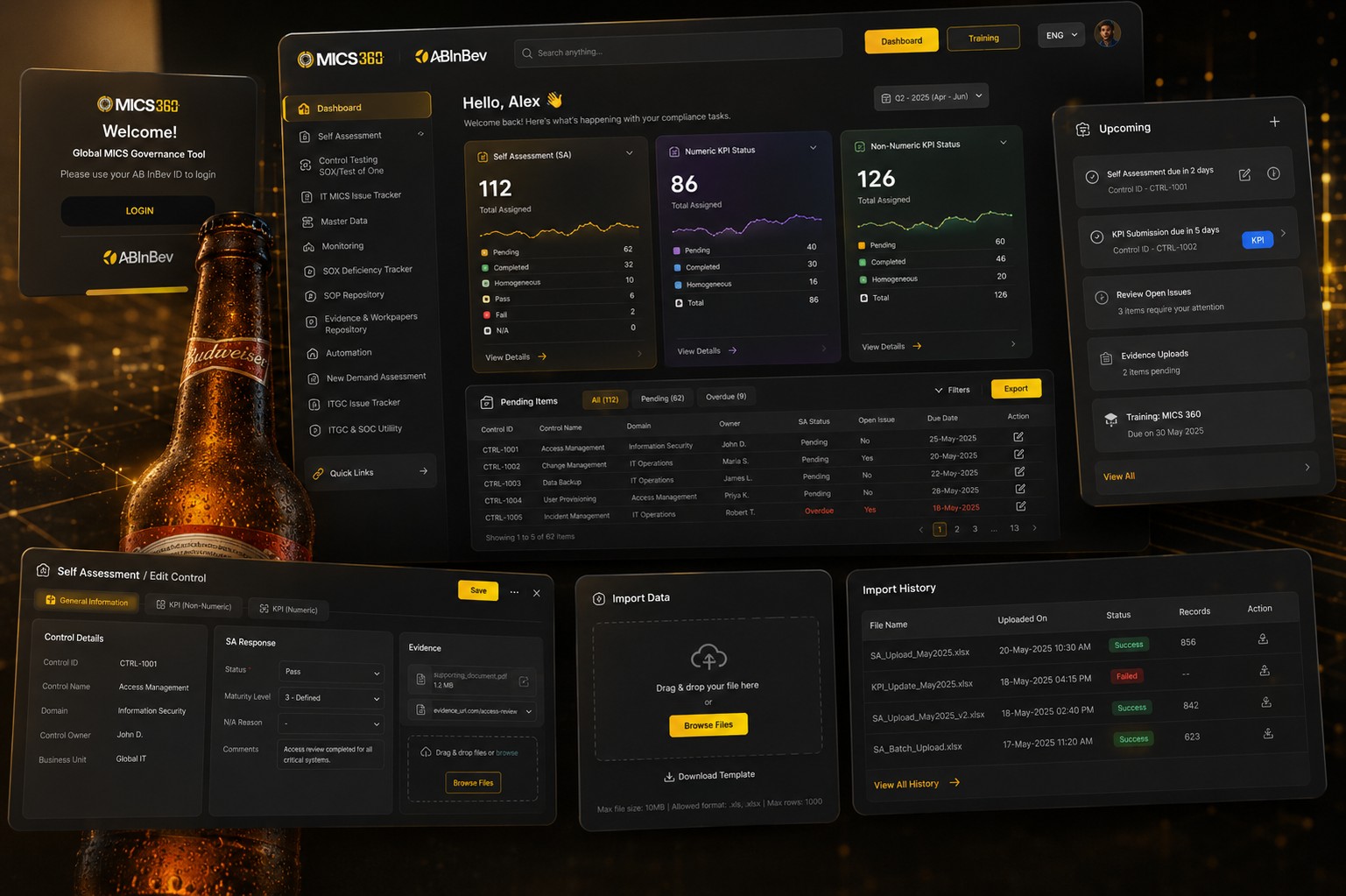
The MICS 360 landing screen on a desktop monitor, a dark interface with the AB InBev brand and a welcome message for a signed in user.
A note on what is shown here. This is a real project I worked on at AB InBev. The screens on this page are recreated and simplified for this write up, since I cannot show the live product with real data. The story and the decisions are accurate.
01 The problem

A tool people needed, that had started working against them.

MICS 360 runs the internal control checks that keep AB InBev compliant across its global operations. Twelve separate tools for things like self assessment, control testing, and issue tracking, used by five thousand people across seven zones, all built on Power Apps.

The problem was never what the platform did. It was how long everything took to do. Logging in was slow. Finding the right module meant hunting through a menu. Forms held their errors until the very end, so a small mistake could cost someone several minutes of redone work.

What people ran into

  • Slow logins and slow screens
  • No clear way to find the right module
  • Little visibility into what was pending
  • Long forms with validation shown too late
  • Records piling up with no easy way to sort them

What the business was watching

  • Reporting cycles slipping
  • Rising cost to maintain the old system
  • A real risk that people would resist the move
  • Thirty nine compliance controls that could not be simplified away
02 Who I designed for

One person, three roles, the same quarterly deadline.

Most people on the platform fall into one of three roles. A Control Owner completes the self assessment for their area. A Tester checks that controls are actually working. A Reviewer signs off. All three needed the same thing done faster: log in, find their pending work, complete it, and trust that the system caught their mistakes before submission, not after.

I kept a simple picture of a Control Owner in mind while designing, someone with a quarterly self assessment to finish, KPIs to update, and evidence to upload, on top of their actual job.

03 The flow

The same ten steps, rebuilt end to end.

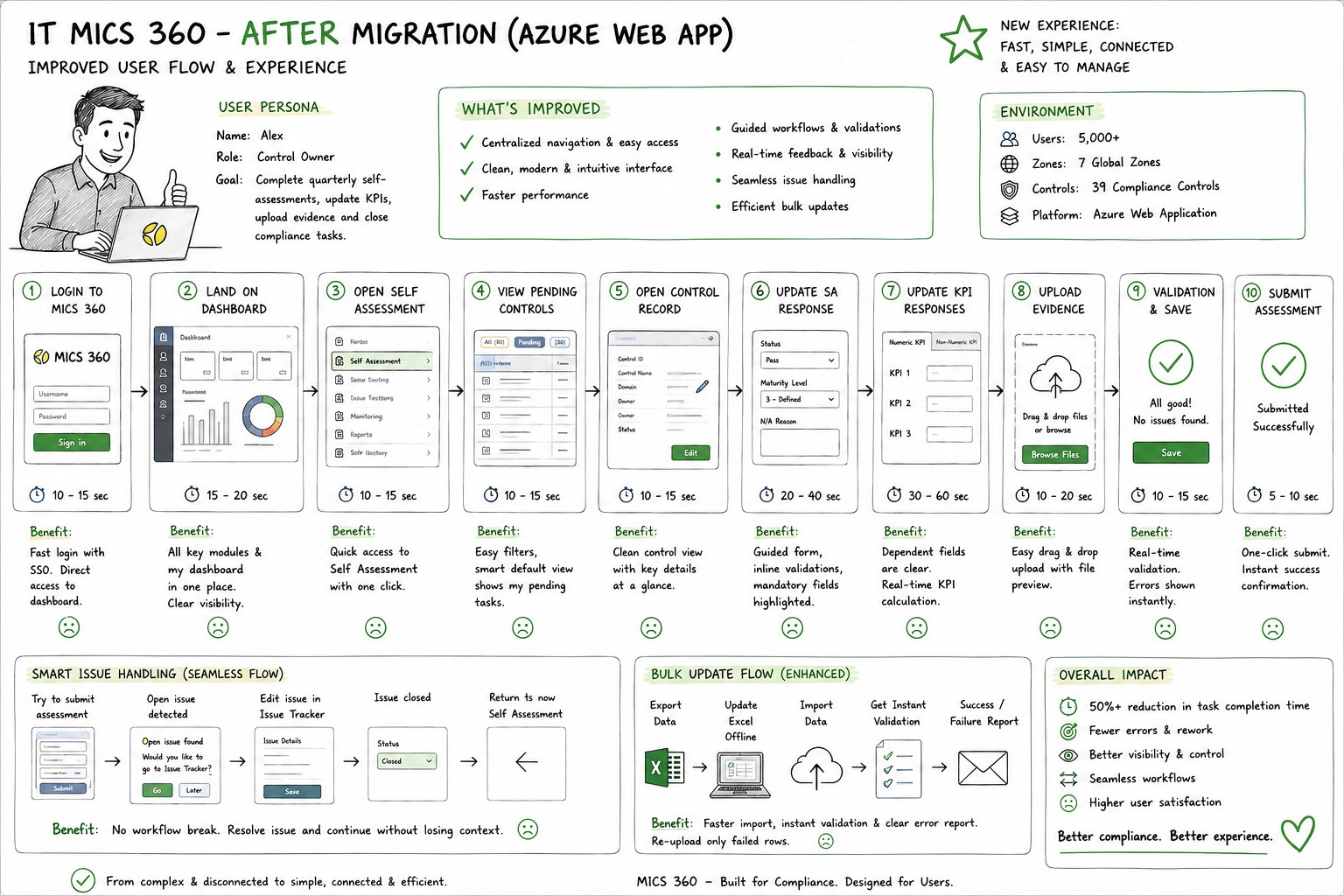
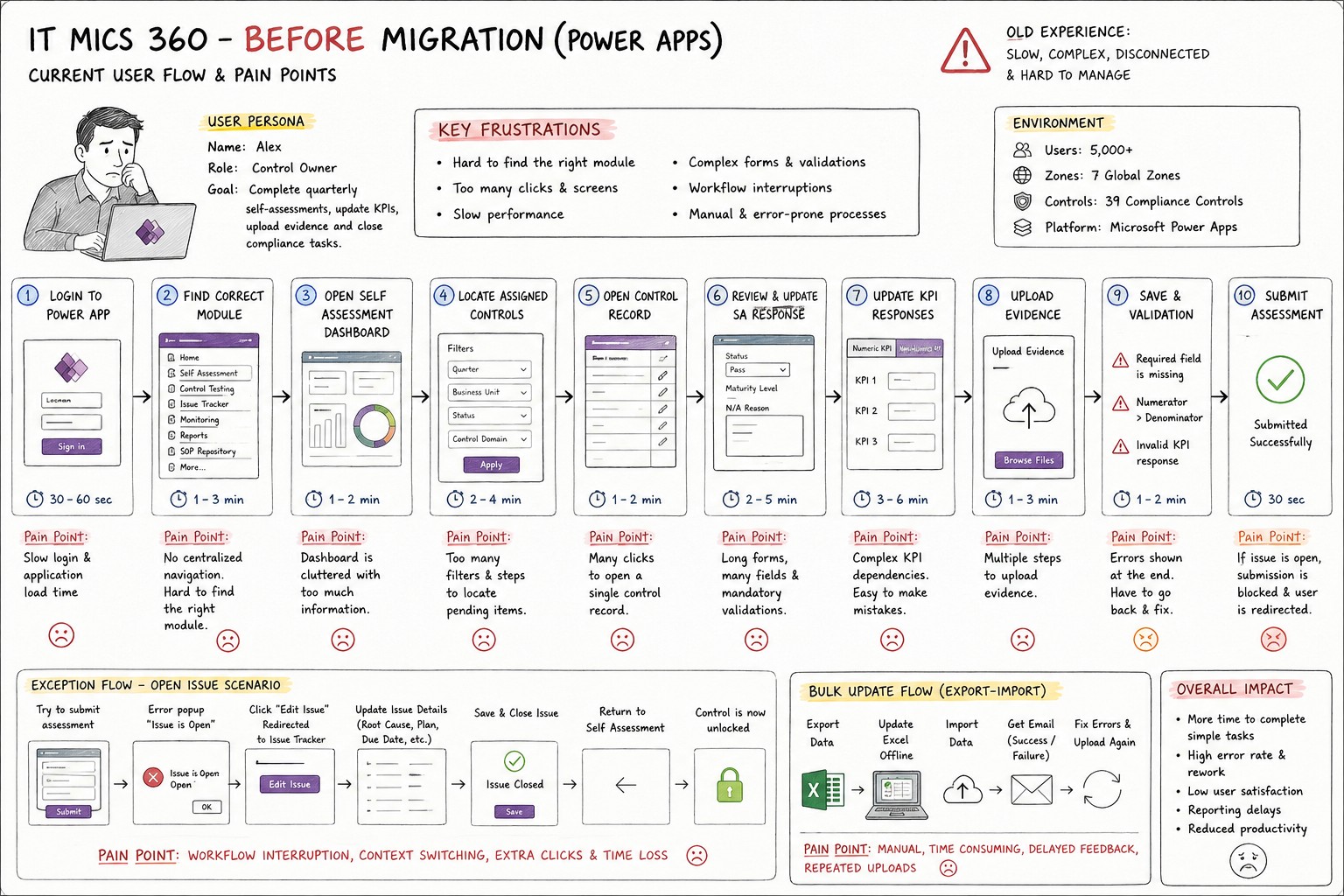
Self assessment is the most used workflow on the platform, so it is the one I mapped in full. Both versions below cover the same journey: log in, find the assessment, update every KPI, attach evidence, and submit. Nothing about what the job requires changed. Almost everything about how long it took did.

The ten step self assessment flow before migration, in Power Apps, with pain points noted at each step: slow login, no centralized navigation, cluttered dashboard, complex KPI dependencies, and errors shown only at the end.
BeforePower Apps. Ten steps, most of them slower than they needed to be, ending with errors the person only found out about after trying to submit.
The same ten step self assessment flow after migration, on the new web app, with single sign on, a unified dashboard, guided forms, real time validation, and one click submission.
AfterThe same ten steps, now with single sign on, one dashboard for everything, and validation that shows up while you are typing instead of after you try to leave.

Login dropped from around a minute to about fifteen seconds. Finding the right module went from a few minutes of hunting to a single click. Nothing on this list was a small tweak. Each one came from watching where a Control Owner actually lost time.

04 What I decided

Four decisions that shaped the new platform.

Navigation

One hub instead of twelve doors

People used to open several disconnected tools to do related work. Everything now sits behind a single homepage, with direct links into every module, so getting to the right place stopped being a task of its own.

Structure

Splitting dense workspaces into clear tabs

A control record used to be one long page holding general details, KPI numbers, and evidence all at once. I split it into tabs, so a person only sees the part of the record they are working on at that moment.

Validation

Catching mistakes while they happen

The old system waited until submission to flag a missing field or a broken KPI dependency. The new one checks as you go, right where you are working, so a mistake gets fixed in seconds instead of discovered five steps later.

Scale

A proper path for bulk updates

Some teams manage hundreds of records at once. Editing them one at a time in a form was never realistic. The new flow lets people export data, edit it offline, and re-upload it, with only the rows that failed coming back for a fix.

05 The screens

Dashboard, control record, and the import flow.

A quick look at the everyday screens: signing in, the dashboard someone lands on, the self assessment workspace with its tabs, and the bulk import and history views for teams handling larger volumes.

A set of MICS 360 screens after migration: sign in, the dashboard with self assessment and KPI status cards and a pending items table, the edit control workspace with general information, KPI, and evidence tabs, plus the import data and import history views.
AfterSign in, dashboard, an open control record, and the bulk import flow, in the visual language the whole platform now shares.
06 Underneath it

Twelve modules, one place to find any of them.

Self assessment is the one most people touch every quarter, but the platform covers the full spread of compliance work. All twelve now live behind the same navigation, shared by Control Owners, Testers, and Reviewers alike.

01Master Data
02Self Assessment
03Control Testing
04Issue Tracker
05SOP Repository
06New Demand Assessment
07MICS Monitoring
08ITGC Issue Tracker
09Evidence and Workpapers
10SOX Deficiency Tracker
11ITGC and SOC Utility
12Automation
07 Outcome

Faster for everyone, and nothing lost along the way.

The goal was never speed for its own sake. It was giving five thousand people their time back on a task they have to do whether they like it or not, while keeping every one of the thirty nine controls exactly as strict as compliance requires.

50%+
Faster task completion across the core flow
5,000+
Users moved across 7 global zones
39
Compliance controls kept fully intact
12
Modules unified into one platform
08 What people said

Feedback from reviews and testing.

Gathered during UAT and design reviews. Names are left out, roles are not.

"The new platform finally feels like one place. Finding my pending controls used to take minutes. Now it is the first thing I see."

Control Owner, UAT participant

"Inline validation changed everything. We catch issues while typing instead of at submission, so there is a lot less rework."

Compliance Manager, Governance team

"The design kept our business rules intact while making the day to day work much simpler. Adoption went smoother than we expected."

Product Owner, Technology Compliance

"Bulk import with instant feedback saved us hours each cycle. Only the failed rows come back. No more guessing which ones broke."

Control Tester, Regional zone
09 What I learned

A migration is a change project that happens to need an interface.

The interface is the smaller half of the job

Business rules, how people would adopt it, and keeping the service running through the switch mattered as much as any screen I drew.

Keeping familiar words lowers resistance

People adapt to a new layout faster than they adapt to new terms for things they already know. I kept the language people already used, even when a cleaner term existed.

Show the error where it happened

Validation at the point of interaction stopped more mistakes than validation that blocks submission ever did.

Decide on scale early

Planning for bulk workflows and larger data volumes from the start avoided a late, painful patch once real usage arrived.

Thanks for reading

Built for compliance. Designed for the people who actually use it.