Product Design · Case Study

TempleAddress

A booking system for temple rituals, built for devotees who have never installed an app.

Role
Product Design
& Co-founder
Timeline
2024–25
Ongoing
Surfaces
Web · WhatsApp
Admin CMS
Status
Live
20+ temples
20+
Temples onboarded
No paid outreach
50+
Active devotees
Word of mouth
₹0
Marketing spend
All organic
Live product · interactive Open ↗
Open the live product
Fully interactive. If it doesn't load inline, open it directly.
Open live product ↗
01 The problem

To book a temple ritual, you make a phone call.

Temple information lives in Facebook groups, printed notices and WhatsApp forwards. When someone wants to book a pooja, they call the temple office and read out the details: which offering, what date, the devotee's name, their birth star. The office writes it in a ledger.

The person doing this is usually over 55, more comfortable in Malayalam than English, and has scanned a QR code before but never installed an app. On the temple side, one secretary fields 30–40 of these calls a day, most of them just asking for pooja timings.

"I had to call my cousin's friend just to find out what time the morning pooja starts. There should be an easier way."

Devotee, 58 · Thrissur · user interview
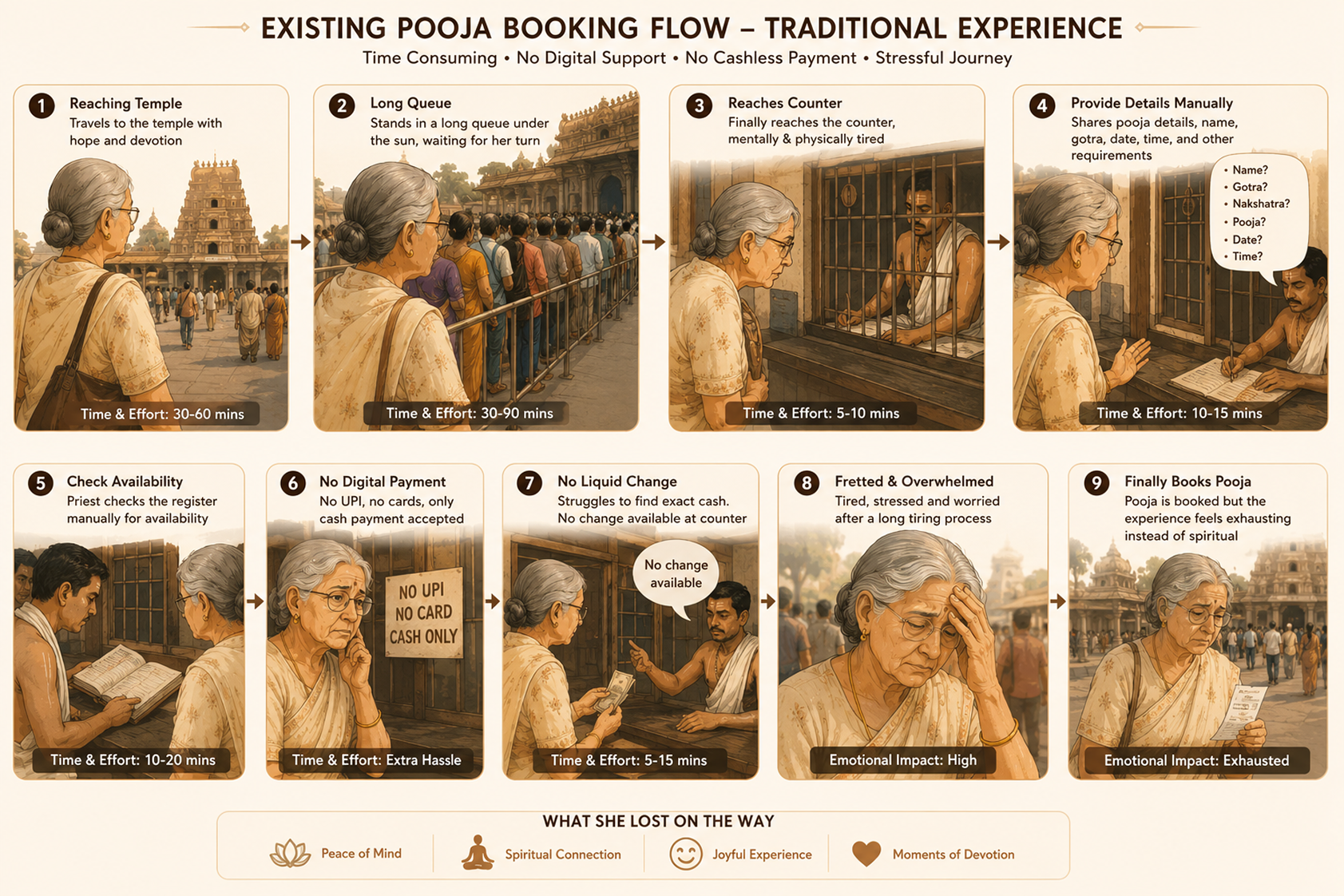
The existing pooja booking journey for a 55+ devotee: travel to the temple, wait in a long queue, give details by hand, no digital payment — nine effort-heavy steps ending in exhaustion.
BeforeThe journey today: nine steps for a 55+ devotee, ending in fatigue rather than devotion.
02 Research

Eight weeks with devotees, priests and temple offices.

I ran interviews with 50+ devotees and 10+ temple administrators, sat in on bookings on-site, and read the temple WhatsApp groups people actually use. Four findings shaped every decision that followed.

01

Trust comes before usability

People didn't avoid digital booking because it was hard. They avoided it because they couldn't tell if a page was the real temple. An unverified Facebook page made them fear the offering wouldn't actually happen.

02

The phone call is the existing interface

The thing I was replacing wasn't another app — it was a conversation. "Which pooja? What time? Name is X, star is Y, book for my family too?" That call became the benchmark, not a generic booking form.

03

The birth star is not optional

Every administrator said it: without the devotee's nakshatram, the priest can't personalise the ritual. Standard booking systems drop this field. It had to be required, and painless to enter.

04

The real user is 55+, not 25

On-site visitors were mostly 50–75, with limited smartphone familiarity. Designing for them — not a tech-savvy version of them — changed every screen.

MethodWhoWhat it told us
Interviews50+ devotees, 30–75 yrsTrust, not usability, is the adoption barrier
Stakeholder sessions10+ temple administrators~70% of calls are repeat schedule queries
Contextual inquiryOn-site visitorsElderly users dominate; 55+ is the median
Community observationTemple WhatsApp groupsInformation is fragmented and unverifiable
03 The pivot

The first version failed testing. That was the useful part.

We first built the obvious thing: a full web portal and a companion mobile app. Rich UI, browsing, filters — what we assumed a modern temple platform should be. Then we put it in front of elderly devotees for acceptance testing.

It didn't work. Too many steps, unfamiliar patterns. One participant couldn't finish a booking without help. Another looked for the phone number to call instead. A committee member reframed the whole project in one sentence:

"They don't want a new app. They want the experience they already trust — just faster. They trust WhatsApp. They trust scanning the QR at the temple gate."

Temple committee member · Thrissur · second round

So we rebuilt around two ways people already behave, and shipped both.

On-site

QR → web

A printed QR at the temple entrance. Scan with the native camera — no download, no URL to type — and land on that temple's booking page. Being physically at the temple is the trust signal.

Remote

WhatsApp assistant

For devotees who never open a browser — NRIs, rural users — a WhatsApp assistant answers in their language and starts the booking, then hands off to the web page for payment via a single deep link.

A fully self-contained WhatsApp checkout was expensive to build and maintain, so the hybrid handoff — chat for discovery, web for the final steps — kept the backend simple while keeping the experience continuous.

04 The flow

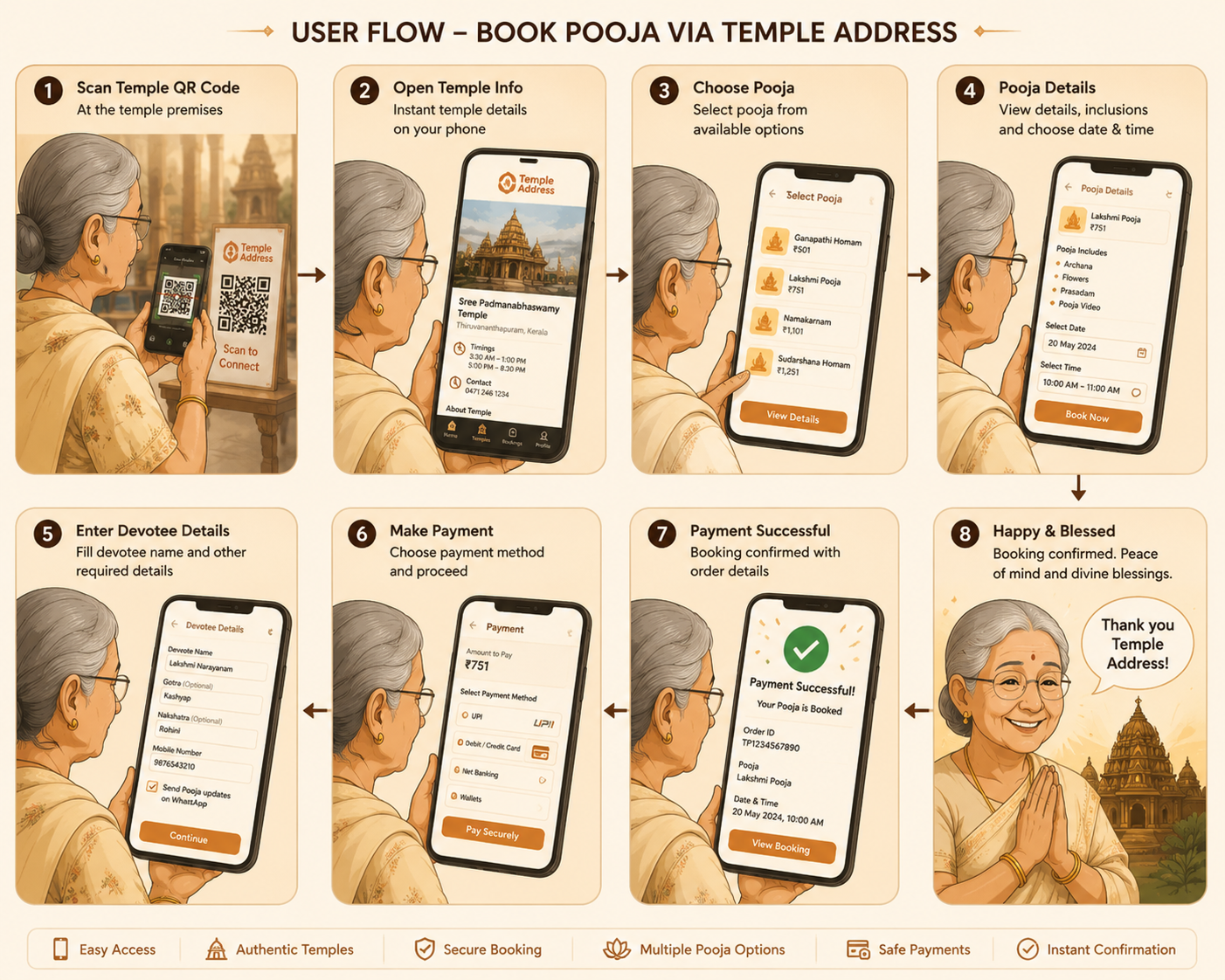
Eight steps, mapped to the phone call they replace.

Each step matches something the devotee would have said on the phone. Median completion is under two minutes.

01

Scan QR at temple

Native camera, no install, no typing. Lands instantly.

02

Temple page

Deity, timings, offerings. Physical presence verifies trust.

03

Choose offering

A list, not a grid — read like a menu. Name, time, price.

04

Phone + OTP

Passwordless, and only after choosing — intent before friction.

05

Add devotees

Name + birth star. Repeat for family in the same pattern.

06

Pick date

Next seven days up front; full month behind a toggle.

07

Review

Temple, offering, devotees, date, total. No surprises.

08

Pay via UPI

Booking ID and the temple's own number on confirmation.

Booking a pooja via TempleAddress: scan the temple QR, open the temple page, choose a pooja, enter devotee details, pay, and get confirmation — eight calm steps ending happy and blessed.
AfterThe same devotee, QR to confirmation, in eight calm steps.
05 The shipped product

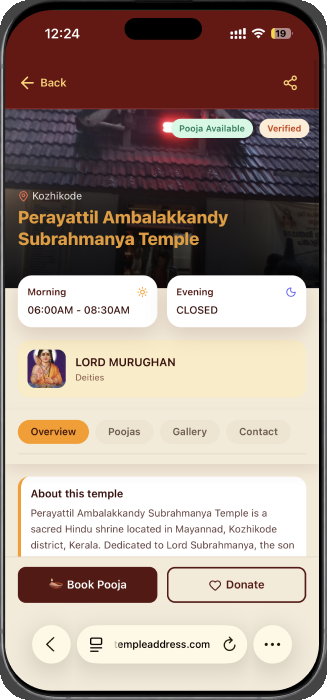
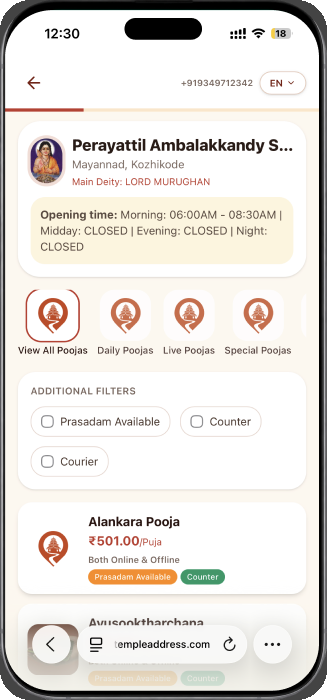
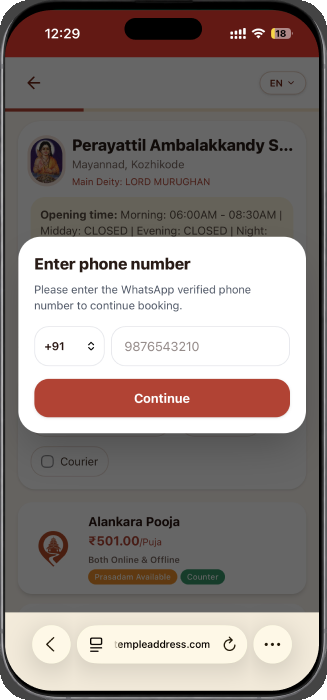
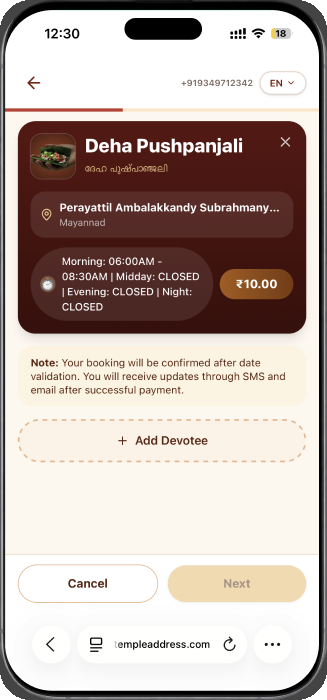
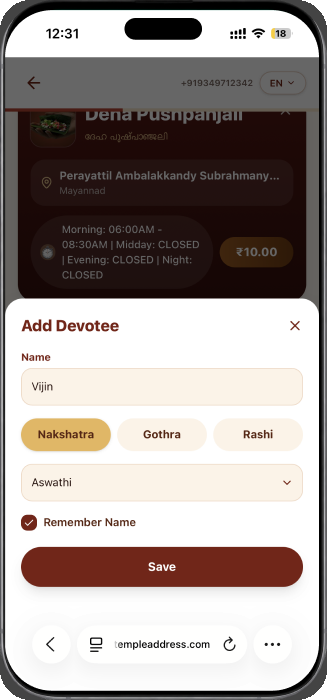
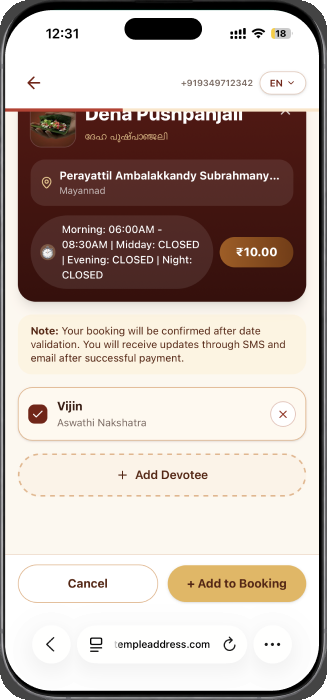
Temple page to booking, in the real interface.

Bilingual (Malayalam + English), mobile-first, in a terracotta and gold palette drawn from Kerala temple tradition — chosen so it reads as sacred, not as a generic booking tool.

06 Key decisions

Four choices that came straight from research.

Cultural fit

Birth star as a required, searchable field

There are 27 nakshatrams — too many for a dropdown an elderly user would scroll. It's a search-as-you-type field, required, because the ritual depends on it. No other booking tool asks for it; the priests need it.

Legibility

A list, not a grid, for offerings

In testing, older users read a vertical list far more reliably than a grid of cards. It looks like the temple's printed menu, which is what they expect.

Access

No app install, by strategy

App-store download is a hard drop-off point: find the app, make an account, grant permissions. The QR at the gate becomes the interface instead. Any camera phone can book in under two minutes.

Sequencing

Authentication after selection, not before

The phone-and-OTP step appears only once the devotee has chosen a pooja, so they're already committed. Asking to log in first would lose the exact user we were designing for.

07 The WhatsApp assistant

For the devotee who never opens a browser.

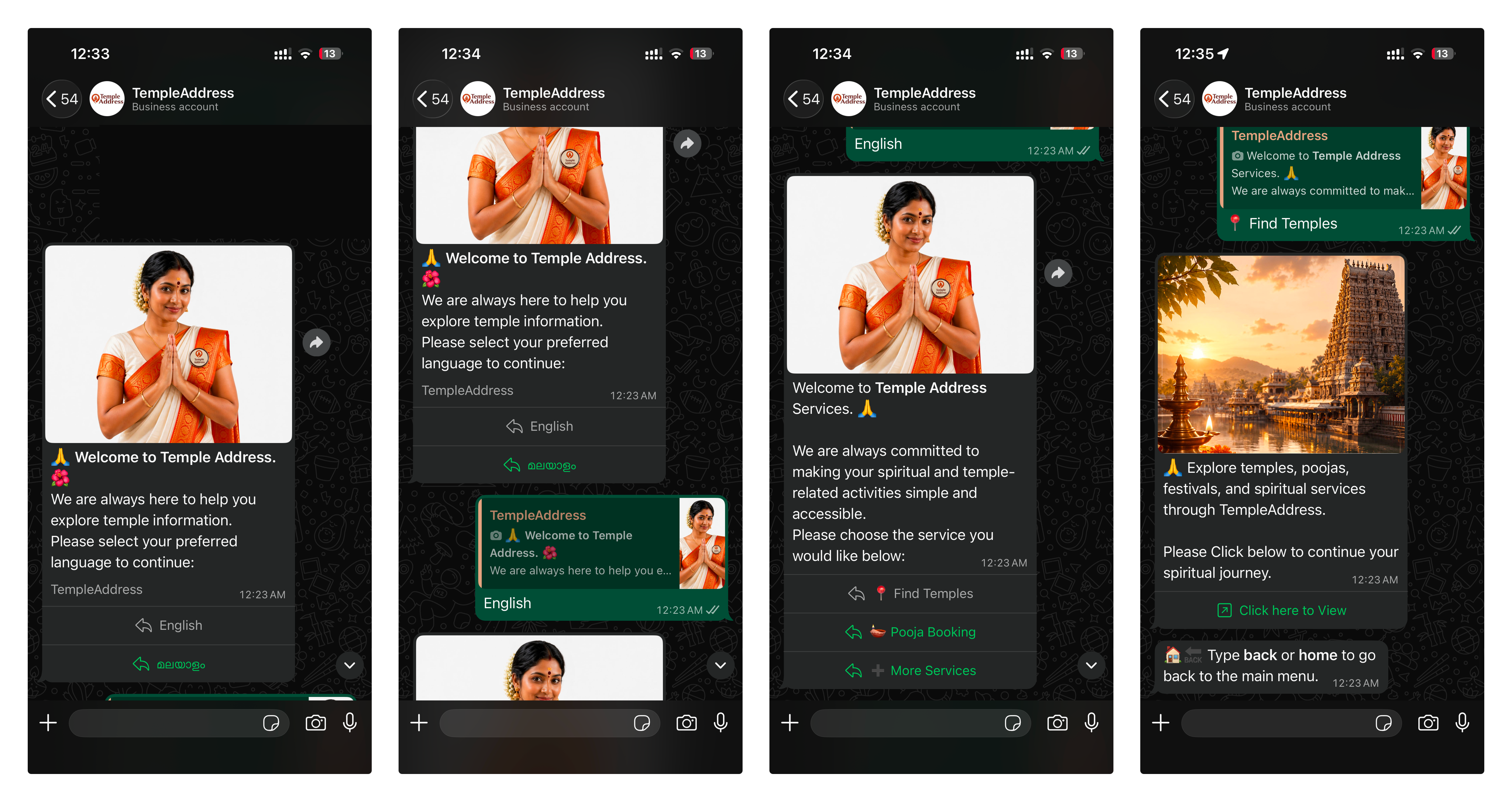
For many devotees — especially overseas family and rural users — WhatsApp is the one digital surface they fully trust. The assistant answers temple questions and starts a booking in natural language, in Malayalam, Tamil or Hindi, pulling live temple data, then hands off to the web page for payment.

The live TempleAddress WhatsApp assistant across four screens: choose language, welcome, a service menu, and a temple discovery reply with a photo and a view link.
LiveThe real assistant, end to end: language → welcome → menu → temple discovery. These are live screens, not mockups.
08 Impact

Early validation, with no marketing spend.

Every temple and devotee came from temples sharing their own QR codes. That's the signal that matters: if administrators are promoting it themselves, it's doing real work for them.

20+
Temples onboarded
Committees referred neighbours
50+
Active devotees
Repeat users, not curiosity
20+
Monthly bookings
Recurring, growing month on month

"Earlier I was getting 30 to 40 calls a day, just for pooja timings and booking. Now most of that comes through the app. I can focus on the temple work instead of the phone."

Temple secretary · Thrissur district · three months after onboarding
09 What I took from it

Three things that will carry to the next project.

Ask what the existing UX is

Instead of "what do you want from a booking system," I asked "walk me through how you book a pooja today." The answer — a phone call — became the benchmark. Match the conversation, don't reinvent it.

Design for the actual user, not the aspirational one

It was tempting to design for a younger, tech-fluent devotee. The real user was a 65-year-old who could scan a QR but had never downloaded an app. That constraint made the product better for everyone.

Trust is built by visible accountability

Putting the temple's own phone number on the confirmation screen did more for adoption than any interface polish. In a culturally sensitive product, you earn trust by being answerable at every step.

The vision

From one temple's gate to India's spiritual infrastructure.

Discovery, booking and temple operations are live. Priest and artist directories, festival tourism and multi-state coverage are next.

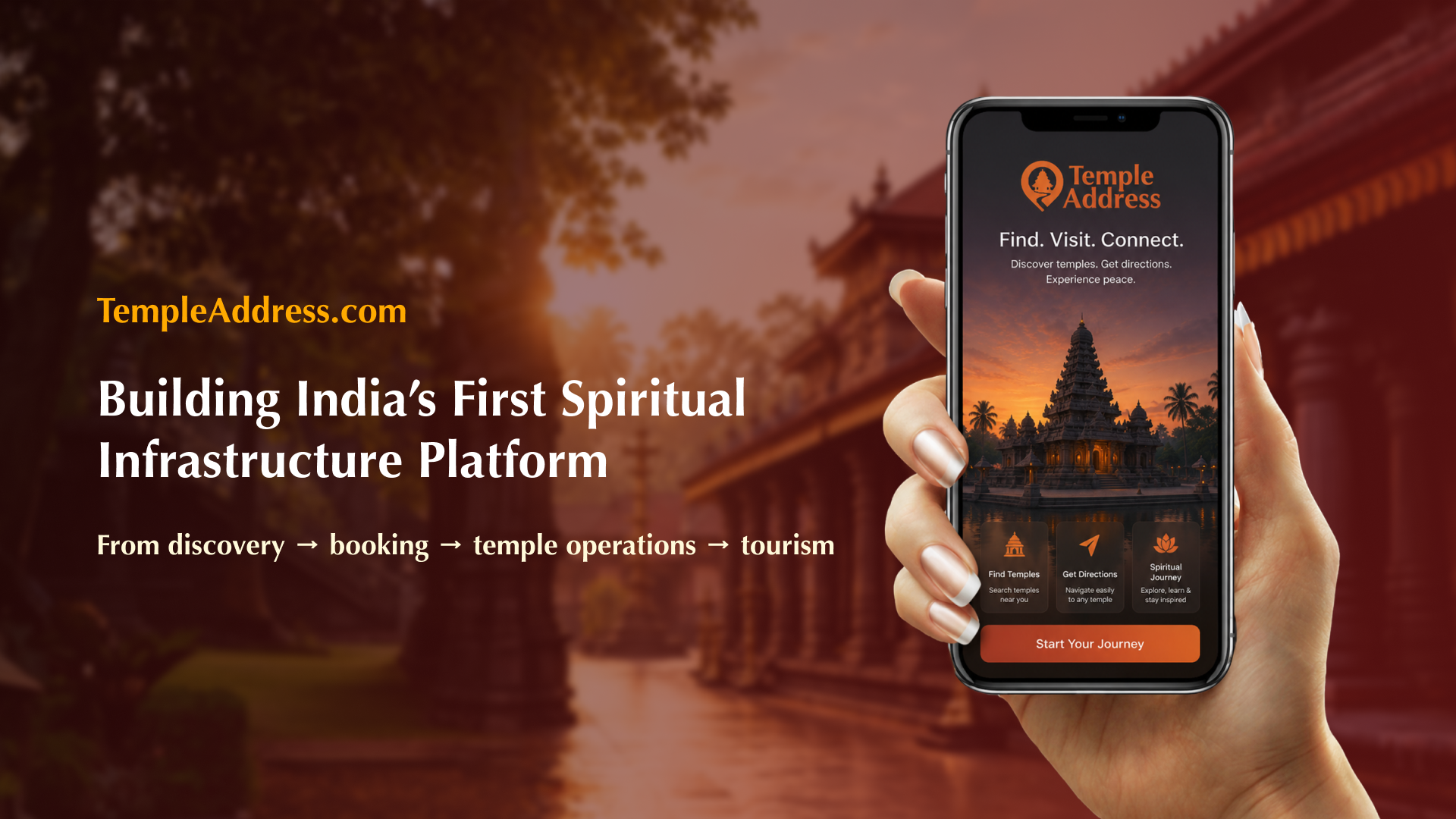
TempleAddress — building India's spiritual infrastructure platform, from discovery to booking to temple operations.
Visit templeaddress.com ↗